FarStone DriveClone Free11
Publisher Description
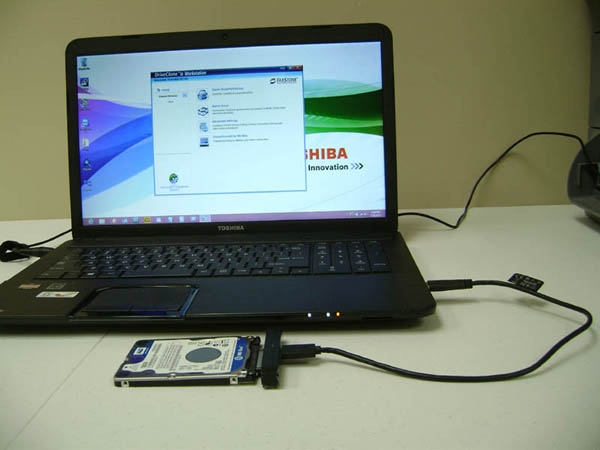
DriveClone
Best Ever PC, Disk, SSD Cloning Migration
DriveClone serves over 1,000,000 of hard drive Windows cloning, is now FREE for non-commercial use.
DriveClone will clone copy your PC entirely, including all files/folders, applications, registries, favorites, settings, and partitions. DriveClone will resize partitions automatically when clone to different size drive. The cloned drive is immediately bootable.
New Features:
Mirror Drive
Rapid Cloning (2 x faster)
Keep up to 99 versions for each modified files
Scheduler incremental cloning
Log
Keep GUID (disk ID) 4K alignment
Fix boot issues - BCD, Boot.ini, PBC, MBR, GUID
Main Features:
Hard Drive to Hard Drive Cloning
Solid State Drive Cloning
SSD Migration
Hard Drive to SSD Cloning
Cloned Hard Drive is Immediately Bootable
Clone Different Size Hard Drives and Solid State Drives
Clone to Bigger or Smaller Drive
Defrag in cloning
Remove Windows junk files
Any Size Drive Cloning (2/3/4TB or bigger drive)
Incremental Cloning
UEFI/GPT/RAID Cloning
Convert to VMware Hyper-v
Mirror Drive
Data Migration made easy
Support: Intel, Samsung, SanDisk, KingsSton, and other SSDs; DriveClone will increase SSD life-time expectancy and performance (up to 20%) with its exclusive Perfect Defrag and Smart Cloning features.
Auto resize partitions
DriveClone makes an exact copy of disk drives, including all types and all sizes of hard drives, solid state drives(SSD), hybrid drives, RAID drives, and UEFI systems . DriveClone will resize partitions automatically when clone to different size drive. The cloned drive is immediately bootable.
Testimonials!
"a true Clone" - William
"thanks for making a truly remarkable product" - apnewsman
"Your program did exactly what it said" - Bill
About FarStone DriveClone Free
This File & Disk Management program is available in English, ChineseSimplified, ChineseTraditional, French, German, Hebrew, Hungarian, Italian, Japanese, Korean, Portuguese, Swedish. It was last updated on 29 September, 2026. FarStone DriveClone Free is compatible with the following operating systems: Windows.
The company that develops FarStone DriveClone Free is FarStone Technology Inc. The latest version released by its developer is 11.
The download we have available for FarStone DriveClone Free has a file size of 21.0 MB. Just click the green Download button above to start the downloading process. The program is listed on our website since 2014-10-22 and was downloaded 167 times. We have already checked if the download link is safe, however for your own protection we recommend that you scan the downloaded software with your antivirus. Your antivirus may detect the FarStone DriveClone Free as malware if the download link is broken.
How to install FarStone DriveClone Free on your Windows device:
- Click on the Download button on our website. This will start the download from the website of the developer.
- Once the FarStone DriveClone Free is downloaded click on it to start the setup process (assuming you are on a desktop computer).
- When the installation is finished you should be able to see and run the program.
Program Details
General
System requirements
Download information
Pricing
Version History
version 11
posted on 2014-10-22
New Features:
Mirror Drive
Rapid Cloning (2 x faster)
Keep up to 99 versions for each modified files
Scheduler incremental cloning
Log
Keep GUID (disk ID) 4K alignment
Fix boot issues - BCD, Boot.ini, PBC, MBR, GUID
